MVA GUI library
Items
Items are objects which the user can add to his video. They are all derived from the AbstractItem class, which itself is derived from QQuickPaintedItem.
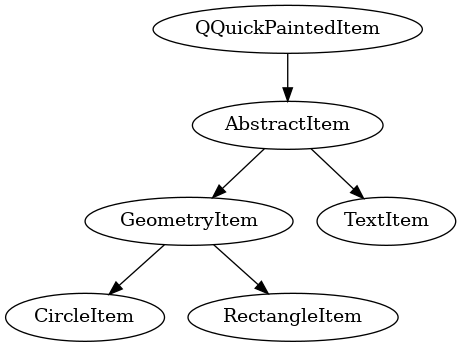
The AbstractItem class is the base of all items and contains the paintItem(QPainter* painter) item function, which paints the item for the renderer. It calls the pure virtual function void QQuickPaintedItem::paint(QPainter *painter) which has to be implemented in every derived item class, like CircleItem or RectangleItem. Using the Qt class QPainter nearly everything can be drawn easily.
Since a QQuickPaintedItem can’t be used as root object in a qml file, every item has a BasicItem parent object, which is derived from QQuickItem. A qml file can now looks like this, where CircleItem is a class derived from AbstractItem:
import QtQuick

import cwa.mva.gui

BasicItem {
    id: rootMVACircle

    abstract_item: circleItem

    CircleItem {
        id: circleItem

        name: "circle"
        borderColor: "blue"

        anchors.fill: parent

        MVAMouseArea {
            anchors.fill: parent
            basicItem: rootMVACircle

            onLeftClicked: {
                rootMVACircle.clicked(circleItem.name)
            }

            onAnimationAdded: (type, start_time, duration) => {
                                rootMVACircle.animationAdded(circleItem.name,
                                                            type,
                                                            start_time,
                                                            duration)
                            }
        }
    }
}
It is important to set abstract_item property in the BasicItem element to the id of the containing AbstractItem element. Also note the MVAMouseArea which is necessary for selecting an item.
Animations
Animations can be added by the user to items, specifying the starting time and duration. All animations are all derived from the AbstractAnimation class, which itself is derived from QObject.
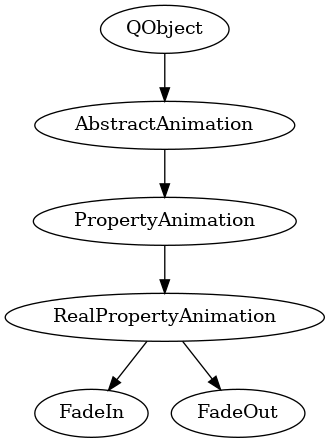
Derived from the AbstractAnimation class is the PropertyAnimation class, which is the base class for animations which are based on item properties. The RealPropertyAnimation class, derived from PropertyAnimation, is the base class for real property based animations like FadeIn and FadeOut. Both animations are changing the opacity of an item from 0 to 1 or reverse.